

AI drawing automation in Autodesk Fusion streamlines the creation of technical drawings from 3D models, enhancing productivity, accuracy, consistency, and cost savings for designers and engineers.
In the ever-changing landscape of design and manufacturing, Autodesk Fusion stands out as a leader in innovation and efficiency. One of its most compelling features is AI drawing automation. This article delves into what drawing automation in Autodesk Fusion is, its benefits, and the specific features that make it an indispensable tool for designers and engineers.
What is AI Drawing Automation in Autodesk Fusion?
Drawing automation in Autodesk Fusion uses advanced tools and features to streamline the creation of technical drawings from 3D models. This process minimizes manual input, reduces the potential for error, and speeds up the entire workflow. Ultimately, AI drawing automation removes the mundane work required to document your designs. It uses Fusion’s capabilities to automatically generate detailed 2D drawings, which are essential for manufacturing and documentation purposes.
Key Features of Drawing Automation
Automatic View Creation
Fusion can automatically create standard orthographic views (top, front, side) from a 3D model. It can also generate isometric views, sectional views, and detailed views without requiring manual setup. This feature ensures that all necessary perspectives are covered, providing a comprehensive understanding of the model.
Dimensioning and Annotations
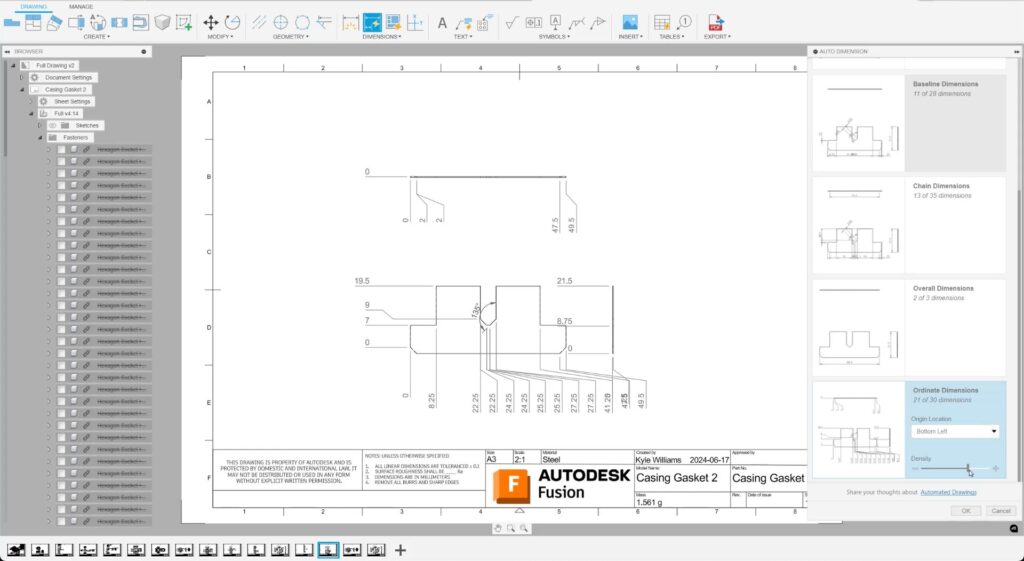
Automatically apply dimensions and annotations based on the 3D model’s geometry. This includes linear dimensions, angular dimensions, radius dimensions, and more. Fusion ensures that these dimensions are accurate and appropriately placed to follow industry standards.
Parts Lists and Bill of Materials (BOM)
Fusion can generate parts lists and BOMs directly from the 3D model. These lists are essential for manufacturing and assembly processes, providing detailed information about each component, including quantities, materials, and part numbers.
Template Customization
Create and customize drawing templates to match your specific standards and requirements. This includes setting up title blocks, borders, and standardized text fields. Once you create a template, it can be reused across multiple projects, ensuring consistency and saving time.
Associativity
Changes made to the 3D model automatically reflect in the 2D drawings. This dynamic link ensures that drawings are always up to date with the latest design iterations, eliminating the need for manual updates and reducing the risk of discrepancies.
Benefits of Drawing Automation
- Increased productivity: By automating repetitive tasks such as view creation, dimensioning, and annotation, drawing automation significantly speeds up the drawing creation process. Designers and engineers can focus on higher-level tasks, such as optimizing designs.
- Enhanced accuracy: Automation reduces the risk of human error, ensuring that dimensions, annotations, and other drawing elements are correctly placed. This accuracy is crucial for manufacturing and assembly, where even minor errors can lead to significant issues.
- Consistency: Automated drawing tools ensure that all drawings adhere to the same standards and conventions. This consistency is vital for clear communication and efficient collaboration among team members and stakeholders.
- Cost savings: By streamlining the drawing process and reducing the likelihood of errors, drawing automation can lead to significant cost savings. Quicker turnaround times mean that projects can be completed faster, while accurate drawings reduce the risk of costly rework and production delays.
- CAM integration: Automated drawings can include detailed manufacturing instructions, which can be directly used to program CNC machines. This integration further streamlines the workflow from design to production.
AI drawing automation in Autodesk Fusion represents a significant leap forward in the design and engineering fields. By leveraging advanced tools and features, it streamlines the creation of technical drawings, making it an indispensable tool for professionals across various industries.
Give Fusion a try today to see how this powerful asset can help you bring your ideas to life with greater efficiency and precision.
This article has been taken from Autodesk.